
I had no studio. No camera. No budget. And exactly 30 minutes before I needed to post a Reel.
What I did have was a Wi-Fi connection, a free Suno account, and a tool called Freebeat that I had been meaning to test for weeks. So I decided: let’s see if the internet’s promises about AI music video tools are actually true — or just hype.
Spoiler: 28 minutes later, I had a fully synced, lyric-overlaid, 9:16 music video sitting in my downloads folder. Ready for Instagram Reels. Ready for YouTube Shorts. And it cost me exactly zero rupees.
This is not a review article where I list specs and move on. This is the exact workflow I used — step by step — so you can replicate it today, even if you have never touched an AI tool before.
Why Indian Creators Need This Workflow Right Now
Let’s be honest about the content creation reality in India in 2026. Video content is no longer optional — it is the baseline. But hiring a videographer for even a basic Reel can cost anywhere from ₹3,000 to ₹15,000 per shoot. Music licensing is a separate headache. And editing software like Premiere Pro or Final Cut requires both a subscription and months of learning.
AI music video tools have changed this equation completely. What used to require a team of three people — a composer, a videographer, and a video editor — can now be done by one person with a laptop and a good internet connection. The tools have matured enough in 2026 that the output is genuinely publishable, not just ‘good for AI.’
The workflow I’m sharing uses two tools: Suno for AI music generation and Freebeat for turning that music into a full music video. Both have functional free plans. Both work in-browser — no software installation needed.
The Tools You Need (And Their Free Plan Limits)
| Tool | What It Does | Free Plan | Paid Plan Starts At |
| Suno | AI music generation from text prompt | ~10 songs/day, non-commercial | $8/month (Pro) |
| Freebeat | Turns your audio into a synced music video | Limited credits, watermark | $9.99/month (Standard) |
| Canva (optional) | Thumbnail & cover art | Free forever | $4.16/month (Pro) |
| CapCut (optional) | Quick mobile edits before posting | Free forever | Free with ads removed |
For this walkthrough, I used only the free plans of Suno and Freebeat. The final output did have a small Freebeat watermark — I will cover how to handle that below.
Step-by-Step: The Exact 30-Minute Workflow
Step 1: Generate Your Track on Suno (7 minutes)
Head to suno.com and create a free account. Once inside, click ‘Create’ and choose the Custom mode — this gives you much more control than the basic prompt.
Here is the prompt structure I use:
[Style] Lo-fi chill hop, 90 BPM. [Mood] Nostalgic, warm, late night study vibes. [Instruments] Soft piano, vinyl crackle, muffled kick drum. [Vocals] No vocals, instrumental only.
Suno generates two variations. Listen to both and pick the one with the better energy arc — meaning it has a clear intro, a build, and a settled ending. This matters because Freebeat uses the song structure to time the visual cuts.
Pro Tip: Instrumental tracks work better for a first attempt because you avoid lip-sync complexity. Once you are comfortable with the workflow, try tracks with AI vocals.
Step 2: Download or Link Your Track to Freebeat (2 minutes)
On Suno, click the three-dot menu on your chosen track and select ‘Download Audio‘ (.mp3). Alternatively, if you prefer not to download, just copy the Suno track link — Freebeat can import directly from a Suno URL without any file transfer.
Open Freebeat in a new tab. Click ‘Create’ and choose ‘Music Video Generator.’ Paste your Suno link or upload the .mp3. Freebeat will analyze the track — this usually takes about 30 to 60 seconds.
Step 3: Choose Your Visual Style and Avatar (5 minutes)
Once Freebeat has analyzed your audio, it presents you with a style selection screen. This is where you decide the visual identity of your video.
Options include cinematic, anime-inspired, abstract, lo-fi aesthetic, and more. For a chill lo-fi track, I chose the ‘Cinematic Warm’ style.
Optionally, you can upload a selfie or reference image to create an avatar that appears in the video. I skipped this for my first test run and used the AI-generated environment instead.
What to look for: Pick a style that matches the energy of your track. An aggressive EDM track needs dynamic, high-contrast visuals. A lo-fi track needs soft, slow-moving scenes. Mismatched style and audio is the most common mistake beginners make.
Step 4: Add Lyrics or Title Text (3 minutes)
Freebeat has a built-in lyric video generator. If your track has lyrics (from Suno’s vocal mode), you can import them here and Freebeat will sync them with karaoke-style timing.
For an instrumental, I used this screen to add a title card at the beginning — just my handle @chaotechh and the track name. Simple and clean.
Step 5: Generate and Export (12 minutes)
Hit ‘Generate.’ Freebeat processes your video — this takes 8 to 15 minutes on the free plan. You will see a progress bar. Go make chai. Seriously.
Once done, preview the video. If the cuts feel off or a scene does not match the mood, you can regenerate specific sections without restarting the whole project. This is one of Freebeat’s genuinely useful features.
Export in 9:16 for Instagram Reels and YouTube Shorts. The free plan exports at up to 720p with a watermark. For 1080p and watermark removal, you need the Standard plan at ₹839/month approximately (pricing may vary).
Step 6: Post It (1 minute)
Upload to Instagram Reels or YouTube Shorts directly. Add your hook in the caption. Use relevant hashtags: #AImusic #AIvideo #contentcreator #IndianCreator #Reels2026.
What I Liked About This Workflow
- The entire thing runs in-browser — no software to install, no hardware requirements beyond a decent internet connection
- Suno’s free plan gives enough songs per day to experiment without pressure
- Freebeat’s audio analysis is genuinely impressive — the visual cuts landed on beats, not randomly
- Freebeat’s Suno integration means no file management at all if you use the URL import
- The lyric video feature is a real timesaver for vocal tracks
- Export formats cover all major platforms: 16:9 for YouTube, 9:16 for Reels, 1:1 for Twitter
What I Did Not Like (Honest Take)
- The free plan watermark is noticeable and sits in the center of the frame — not a corner bug
- Generation time on the free plan is slow: 12 to 15 minutes per video
- Suno’s free plan tracks are non-commercial, meaning you cannot monetize videos that use them without upgrading
- Visual style options on the free plan are limited — the best styles are paywalled
- No offline editing: if your internet drops mid-generation, you may need to restart
Best Choice Based on Your Creator Type
| Creator Type | Recommended Setup | Estimated Cost |
| Beginner / Testing the waters | Suno free + Freebeat free | ₹0 |
| Instagram creator (Reels focus) | Suno Pro + Freebeat Standard | ~₹1,500/month |
| YouTube Shorts creator | Suno Pro + Freebeat Standard | ~₹1,500/month |
| Serious musician / independent artist | Suno Pro + Freebeat Pro | ~₹2,800/month |
| Brand / Business content team | Freebeat Business plan | ~₹5,400/month |
Pro Tips and Hidden Features Most Beginners Miss
Use Suno’s ‘Extend’ Feature for Longer Videos
Suno has an Extend function that lets you lengthen a generated track without starting over. If you generate a 1-minute lo-fi track but want a 3-minute version for a YouTube video, hit Extend twice and Suno will create a seamless continuation. Freebeat then treats it as one long track and builds the full video accordingly.
Freebeat’s Regenerate Section Feature
If you generate a full video but one scene looks visually weak or off-tone, you do not have to redo the whole video. Click on that scene in Freebeat’s timeline and hit Regenerate Section. It will generate a new visual for just that clip while keeping everything else intact. This saves significant time.
The Suno + Freebeat Free Watermark Workaround
If you are on a tight budget and cannot upgrade right now, here is an honest workaround: export the video from Freebeat and open it in CapCut on your phone. Add your own branded text or a visual element that stylistically covers the watermark area. It is not invisible, but it is much better than a bare watermark.
Important: This is only appropriate for personal use or non-monetized content. If you are monetizing, upgrade to the paid plan — it is worth it and it is the ethical thing to do.
Batch Your Content in One Session
Suno’s free plan allows multiple generations per day. In one sitting, you can generate 4 to 6 tracks across different moods — lo-fi, motivational, ambient, upbeat — and then turn each one into a video on Freebeat over the next few days. This way you build a content library without daily effort.
Comparison: Freebeat vs Alternatives
| Feature | Freebeat | Neural Frames | Runway Gen-4 | Pika |
| Audio-reactive visuals | Yes (beat-synced) | Yes (frequency-based) | No | No |
| Suno integration | Yes (direct URL) | No | No | No |
| Lyric video built-in | Yes | Partial | No | No |
| Free plan available | Yes (watermark) | Yes (watermark) | Limited credits | Yes (watermark) |
| Export formats | 9:16, 16:9, 1:1 | Multiple | 16:9 primarily | 9:16, 16:9 |
| Best for | Music videos end-to-end | Electronic / ambient | Cinematic footage | Short clips |
| Learning curve | Low | Medium | High | Very low |
Also Read
Frequently Asked Questions
Can I make a music video with AI for free in India?
Yes. Suno’s free plan generates AI music tracks at no cost, and Freebeat’s free plan turns them into full music videos. The main limitations are a watermark on the exported video and slower generation speeds. For personal use or testing, the free plans work well. For monetized or professional content, upgrading to a paid plan is recommended.
Is Suno free in India?
Yes. Suno offers a free plan that allows a limited number of song generations per day. The free plan tracks are for non-commercial use only. The Pro plan, which allows commercial use and removes daily limits, starts at around $8 per month and can be paid via international credit or debit cards.
Does Freebeat work in India?
Yes. Freebeat is a web-based tool that works on any device with a browser and a stable internet connection. There are no region restrictions. The interface and all features function the same way in India as they do anywhere else.
How long does it take to make an AI music video?
The full workflow — from generating a track on Suno to exporting the final video on Freebeat — takes approximately 25 to 35 minutes on the free plan. Most of that time is passive waiting during generation. The active work (setting up the project, choosing styles, adding text) takes less than 10 minutes.
What is the best AI music video generator for beginners?
For complete beginners, Freebeat is the most beginner-friendly end-to-end music video tool available in 2026. It handles audio analysis, visual generation, and export all in one place, without requiring any video editing skills. Pairing it with Suno for music generation gives you a complete pipeline that requires no prior creative or technical experience.
Can I post AI music videos on Instagram Reels or YouTube Shorts?
Yes, with important caveats. Make sure the music you are using is cleared for the platform. Suno’s free plan tracks are non-commercial — posting them on a monetized YouTube channel technically violates Suno’s terms. On a non-monetized personal Instagram account, the free plan is generally fine for personal sharing. For any monetized content, use Suno’s Pro or Premier plan, which grants commercial licenses.
Is there a completely free AI music video maker with no watermark?
As of April 2026, most reputable AI music video tools include a watermark on their free tier. This is how these platforms sustain their development. Freebeat, Neural Frames, and Pika all watermark free exports. The most cost-effective way to remove watermarks is to upgrade to the lowest paid tier, which typically costs under ₹1,000 per month.
Final Verdict: Is This Workflow Worth It for Indian Creators?
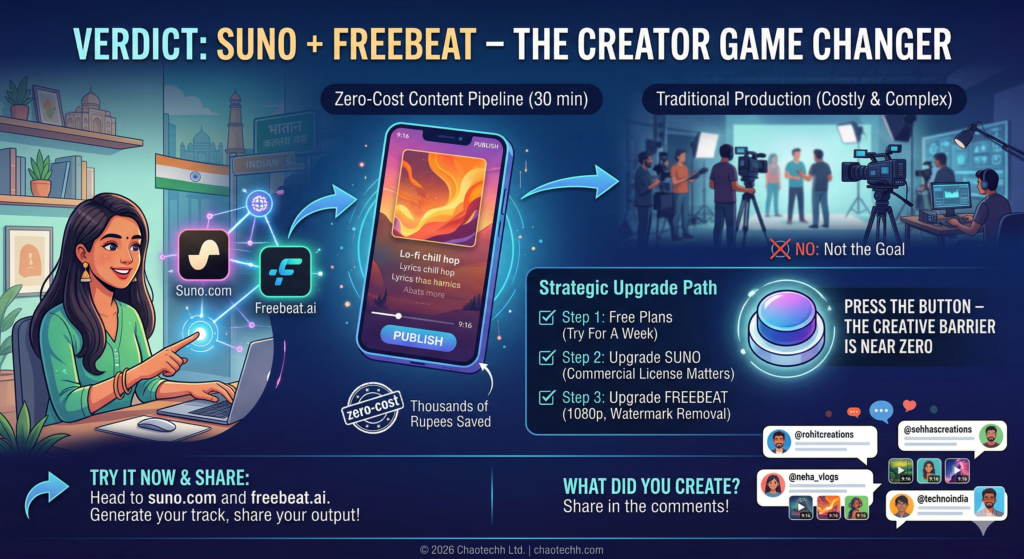
Absolutely — and not just as a novelty experiment. The Suno plus Freebeat workflow is one of the most practical zero-cost content pipelines available to Indian creators right now. In 30 minutes, you get a publishable video asset that would have cost thousands of rupees to produce traditionally.
Is it going to replace a professional music video with a real director, a real camera crew, and real cinematography? No. But that is not the goal. The goal is consistent, good-looking content output without a production budget — and for that, this workflow genuinely delivers.
If you are just starting out, run the free plans for a week and see how your audience responds. If the content performs, upgrade Suno first (the commercial license matters more than anything), then upgrade Freebeat for 1080p and watermark removal.
The creative barrier for Indian content creators has officially dropped to near zero. The only thing left is pressing the button.
Try It Now: Head to suno.com and freebeat.ai, generate your first track, and share your output in the comments. I want to see what you create.
Have questions about the workflow? Drop them below and I will answer every single one.
[…] vs CSK in 4K: The Best JioHotstar Settings for Buffer-Free Streaming I Made a Full Music Video in 30 Minutes Using Free AI Tools in 2026 — Here’s the Exact Work… iPhone 17 Price Drop Alert: How to Get It Under ₹70,000 in India Top 10 AI Agents to Scale […]
[…] How I Did It [2026] RCB vs CSK in 4K: The Best JioHotstar Settings for Buffer-Free Streaming I Made a Full Music Video in 30 Minutes Using Free AI Tools in 2026 — Here’s the Exact Work… iPhone 17 Price Drop Alert: How to Get It Under ₹70,000 in India Top 10 AI Agents to Scale […]
[…] How I Did It [2026] RCB vs CSK in 4K: The Best JioHotstar Settings for Buffer-Free Streaming I Made a Full Music Video in 30 Minutes Using Free AI Tools in 2026 — Here’s the Exact Work… iPhone 17 Price Drop Alert: How to Get It Under ₹70,000 in […]