
Introduction
A few weeks ago, I had a ridiculous idea: what if I could clone my own voice, feed it into an AI music tool, and actually produce a complete song — for free? No recording studio. No expensive software. Just a laptop, a decent internet connection, and some free AI tools that anyone can access.
Spoiler: it worked. And the song actually sounds decent.
In this article, I’m going to walk you through the exact workflow I used — step by step — so you can do this yourself. Whether you’re a content creator, a music hobbyist, or just someone who’s always wanted to hear themselves sing without the embarrassment of actually singing, this guide is for you.
And yes, all the tools I used are completely free. Tested in India. Works on a mid-range laptop and even a decent Android browser.
What Exactly Is AI Voice Cloning?
AI voice cloning is the process of training an AI model on a short sample of your voice so it can replicate how you sound — your tone, accent, pitch, and cadence — and then speak or sing anything you type.
Think of it like teaching a machine to “become” your voice. In 2026, this technology has become surprisingly accessible. Tools that were once locked behind expensive enterprise plans are now offering free tiers with solid quality.
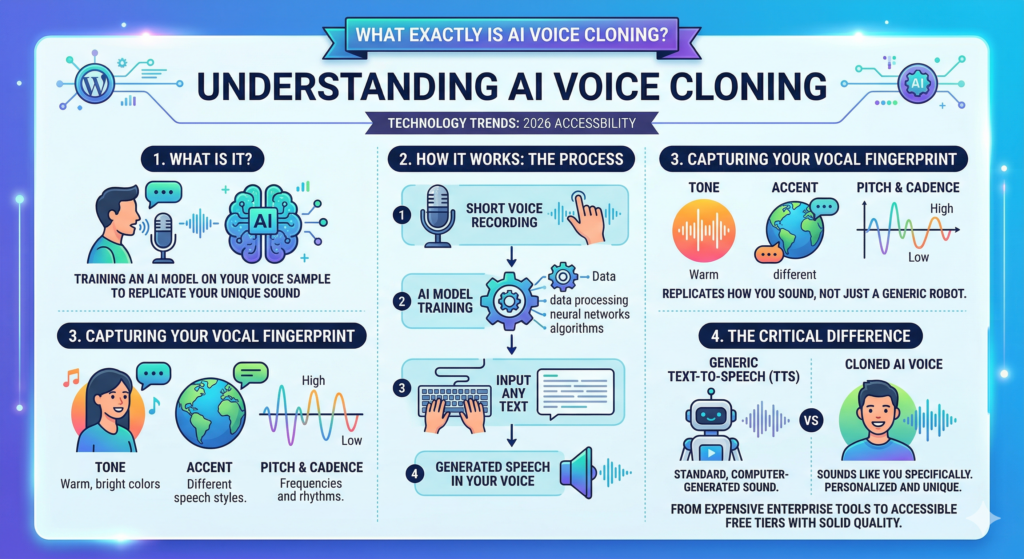
The key difference between voice cloning and just a generic text-to-speech tool is that a cloned voice sounds like YOU specifically — not some generic robot voice.
Why This Is a Big Deal for Creators in India
India has an exploding base of content creators — YouTubers, podcasters, Reels makers, and indie musicians — many of whom don’t have access to professional recording setups or voiceover budgets.
AI voice cloning changes that equation completely. You can:
- Create voiceovers in your own voice without re-recording every time
- Generate Hindi or Hinglish vocals for a track using just text
- Produce AI covers of your favourite songs with your own cloned voice
- Prototype music ideas in minutes, not hours
The best part? None of this requires a music degree, expensive gear, or even a particularly quiet room.
The Free AI Tools I Used (And What Each One Does)
Here are the tools that made up my workflow. I’ve tested all of these from India, on a mid-range laptop with a standard broadband connection.
1. ElevenLabs — Voice Cloning
ElevenLabs is the gold standard for AI voice cloning right now, and their free plan is genuinely usable. You can clone your voice using as little as one minute of clean audio. The free tier gives you 10,000 characters of text-to-speech per month, which is enough for experimenting and short projects.
Free plan limitation to know: The free plan adds a subtle watermark to some exports, and the voice quality is slightly lower than paid tiers. Still very usable for demos and non-commercial work.
2. Suno AI — Song Generation
Suno AI is where the magic really happens. You give it a text prompt — lyrics, genre, mood — and it generates a full song complete with instrumentals and vocals. On the free plan, you get around 50 song credits per day, which resets daily.
Importantly, Suno has a feature where you can upload a reference audio or guide the vocal style with prompts. This is what I used to make the generated song closer to my cloned voice style.
3. Kits.AI — Voice Model Upload (Optional)
Kits.AI lets you train a custom AI voice model and then use it to convert any vocals into your voice. This is the step that bridges the gap between “AI-generated vocals” and “my actual voice singing.” The free tier has limited conversions but it’s enough to test the workflow.
4. Audacity — Free Audio Editing
Audacity is a completely free, open-source audio editor that runs on Windows, Mac, and Linux. I used it to clean up my original voice sample before uploading it to ElevenLabs — removing background noise and normalising the volume. This one step massively improved the cloning quality.
Tools Comparison Table
| Tool | Use Case | Free Plan | Works on Android | India Friendly |
| ElevenLabs | Voice cloning | 10k chars/month | Via browser | Yes (slow) |
| Suno AI | Song generation | 50 songs/day | Via browser | Yes |
| Udio | Music generation | Limited free | Via browser | Yes |
| Kits.AI | AI voice models | Basic free tier | Via browser | Yes |
| Voicemod | Voice effects | Limited free | Android app | Yes |
Step-by-Step: My Exact Workflow
Here’s the exact process I followed. I’d estimate the total time was about 45 minutes on my first try, and around 20 minutes on subsequent attempts once I knew what I was doing.
Step 1: Record a Clean Voice Sample (5 Minutes)
I recorded 60-90 seconds of myself speaking naturally — no music in the background, no fan noise, no traffic sounds. I sat in a small room, used my phone’s voice recorder app, and just read a paragraph from an article out loud.
Pro tip: Don’t try to perform. Speak in your natural, relaxed voice. Exaggerated tone actually confuses the cloning model.
Step 2: Clean the Audio in Audacity (5 Minutes)
Imported the recording into Audacity, ran the built-in Noise Reduction filter (Effect > Noise Reduction), and then normalised the audio (Effect > Normalize). Exported as a .wav file at 44.1kHz.
This step makes a bigger difference than most tutorials admit. ElevenLabs’ cloning works significantly better with clean audio.
Step 3: Clone Your Voice on ElevenLabs (10 Minutes)
- Go to elevenlabs.io and sign up for a free account
- Click on “Voices” > “Add a new voice” > “Instant Voice Cloning”
- Upload your cleaned .wav file
- Give your voice a name and save it
- Test it by typing a sentence and pressing generate
The first time I heard the cloned voice say something I typed, it was genuinely surreal. It sounded about 80-85% like me — same accent, similar cadence, with a slightly smoother tone.
Step 4: Write Your Lyrics and Generate a Song on Suno AI (15 Minutes)
Head to suno.com, sign in with Google (free), and click on “Create.” Here’s the prompt structure I used:
[Genre: Lo-fi Hip Hop] [Mood: Reflective, calm] [Lyrics: paste your lyrics here] [Vocal style: Indian male, smooth, conversational]
I wrote simple 2-verse lyrics about a late-night scrolling session — very relatable, deliberately generic so the AI could interpret them well. Suno generated two versions of the full song in about 30 seconds each. I picked the one I liked more.
Step 5: Voice Conversion on Kits.AI (10 Minutes)
This is the step that ties it all together. I downloaded the Suno-generated track (which had its own AI vocalist), then went to Kits.AI:
- Upload the Suno vocal track (isolate vocals first using uvr5.io if needed — also free)
- Select your uploaded voice model or create one using ElevenLabs output
- Run the voice conversion
The result: a version of the Suno song where the vocals now sound significantly closer to my cloned voice. Not perfect — but genuinely impressive for a fully free workflow.
Step 6: Final Mix (Optional, 5 Minutes)
I brought the converted vocal track and the Suno instrumental back into Audacity, aligned them, adjusted the volumes, and exported the final song as an MP3. Done.
What I Like About This Workflow
- Completely free — zero rupees spent
- Works in India without a VPN for all tools mentioned
- Results are genuinely shareable — not embarrassing quality
- Suno AI’s free daily credits reset, so you can keep experimenting
- ElevenLabs’ voice cloning accuracy is remarkably good for a free tier
- Great for content creators who want a consistent AI voiceover for their channel
What I Don’t Like (Honest Take)
- ElevenLabs free plan has a watermark on some exported audio — noticeable in quiet tracks
- Suno AI vocals don’t always match the exact style you prompt for
- Kits.AI voice conversion on free plan has limited monthly conversions
- The cloned voice works best for speaking; singing conversion is still a bit robotic at the edges
- You’ll need a decent internet connection — some steps are slow on mobile data
Who Is This Best For?
Content Creators & YouTubers: Use your cloned voice for consistent AI voiceovers across videos without re-recording every time. Great for faceless channels.
Indie Musicians & Hobbyists: Prototype song ideas quickly. Hear what your lyrics actually sound like set to music before investing time in a real recording.
Reels & Shorts Makers: Generate original background music with a custom vocal hook in your own voice — no copyright worries for original compositions.
Students & Beginners: Explore AI music creation with zero investment. This workflow is genuinely beginner-friendly with no DAW knowledge required.
Pro Tips & Hidden Features
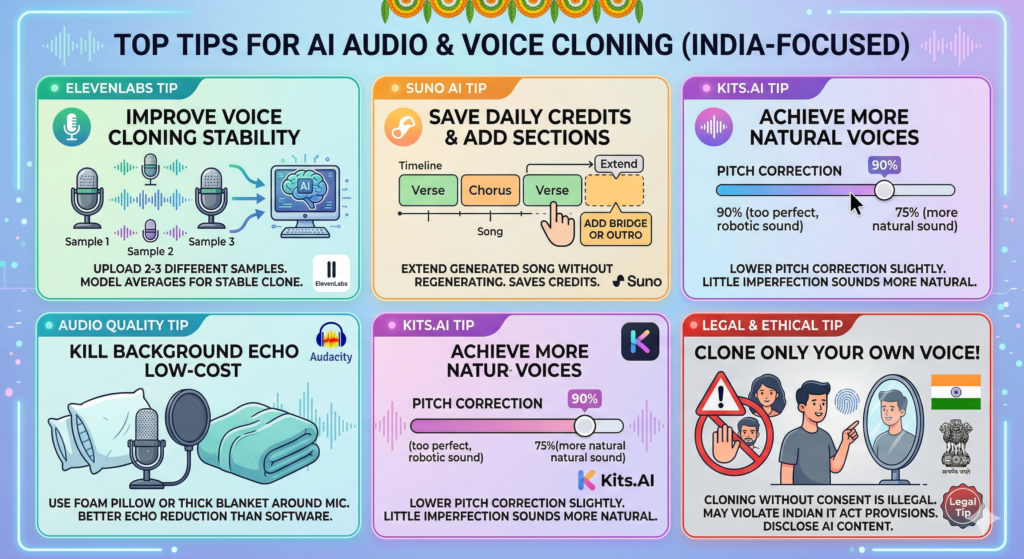
ElevenLabs tip: If your cloned voice sounds slightly off, try uploading 2-3 different voice samples instead of one. The model averages them and produces a more stable clone.
Suno AI tip: Use the “Extend” feature on a generated song to add a bridge or outro without regenerating the whole track. This saves your daily credits.
Audio quality tip: Use a foam pillow or thick blanket around your phone/mic when recording your voice sample. It kills background echo that Audacity can’t remove.
Kits.AI tip: Lower the “pitch correction” slider slightly if the converted voice sounds too perfect — a little imperfection actually sounds more natural.
Legal tip: Only clone your own voice. Using this workflow to clone someone else’s voice without consent is a privacy violation and potentially illegal under Indian IT Act provisions. Always disclose AI-generated content where required.
Is AI Voice Cloning Legal in India?
This is a question a lot of people have, and it’s worth addressing directly. Cloning your own voice and using it for personal or creative projects is generally considered fine. The legal grey areas arise when:
- You clone someone else’s voice without their consent
- You use a cloned voice to spread misinformation or impersonate someone
- You use AI-generated music commercially without checking the platform’s commercial licensing terms
For personal projects, creative experimentation, and non-commercial content, this workflow is safe. Always check the terms of service of each tool before monetising your output.
Frequently Asked Questions
Can I really clone my voice for free in 2026?
Yes. ElevenLabs offers a free Instant Voice Cloning feature with a 10,000 character monthly limit. The quality is noticeably good for a free tier, though paid plans offer more accuracy and no watermarks.
How much audio do I need to clone my voice?
ElevenLabs recommends a minimum of 1 minute of clean audio. However, more is better — 2-5 minutes of varied speech produces a more stable and natural-sounding clone.
Does this work on an Android phone?
Partially. All the tools mentioned work via mobile browser on Android. The recording and Audacity editing steps work better on a laptop, but you can absolutely use a phone voice recorder for the sample and do everything else in a browser.
Is Suno AI available in India for free?
Yes. Suno AI is accessible from India without a VPN and offers a free plan with around 50 song credits per day that reset daily. This is more than enough for personal experimentation.
What’s the difference between AI voice cloning and AI singing?
Voice cloning replicates your speech patterns and applies them to text-to-speech output. AI singing uses those characteristics but maps them to musical pitch and rhythm, which is a harder problem — which is why voice conversion tools like Kits.AI are needed to bridge the two.
Can I use this for my YouTube channel?
Yes, for non-commercial or ad-free content. If you plan to monetise, check ElevenLabs’ and Suno AI’s commercial licensing terms carefully. Some free plan outputs have restrictions on commercial use.
Final Verdict
I went into this experiment half-expecting it to fail. What I got instead was a genuinely listenable song featuring a pretty convincing clone of my own voice — produced entirely using free tools in under an hour.
Is it perfect? No. The voice conversion still has some robotic edges, and the free plan limits mean you’re working within constraints. But as a proof of concept — and as a genuinely useful creative workflow — it absolutely delivers.
If you’re a content creator in India looking for a way to produce original audio content without a studio setup or a big budget, this workflow is worth every minute you spend learning it.
The technology is only going to get better from here. The best time to start experimenting with it is right now — while the free plans are still this generous.
Give it a try and let me know in the comments how your first AI song turns out. I’d love to hear it.
Related Articles You’ll Love
- I Made a Full Music Video in 30 Minutes Using Free AI Tools in 2026 — Here’s the Exact Workflow
- Best Free AI Apps for Android in 2026 [Tested in India]
- RCB vs CSK in 4K: The Best JioHotstar Settings for Buffer-Free Streaming
- AI Agents for Content Creators: The Tools Actually Worth Using in 2026